


Golden Technologies
Golden Technologies | ZK3200-HC | Lift Chair Remote Hand Control
Golden Technologies | ZK3200-HC | Lift Chair Remote Hand Control
In stock
Couldn't load pickup availability
- Free 2-day shipping when you order before 2:00 PM EST (M-F)(Contiguous US Only)
- Need it tomorrow? Select overnight shipping at checkout before 2:00 PM EST (M-F)(Contiguous 48 states).
- 30 Day Return Policy
- Fulfillment: Usually ships in 1-2 business days
- This Product Is Backed By A 90-day Limited Warranty Against Manufacturing Defects
Product Description
- Manufacturer:
- Golden Technologies
- Part Number:
- ZK3200-HC
- Connector Type:
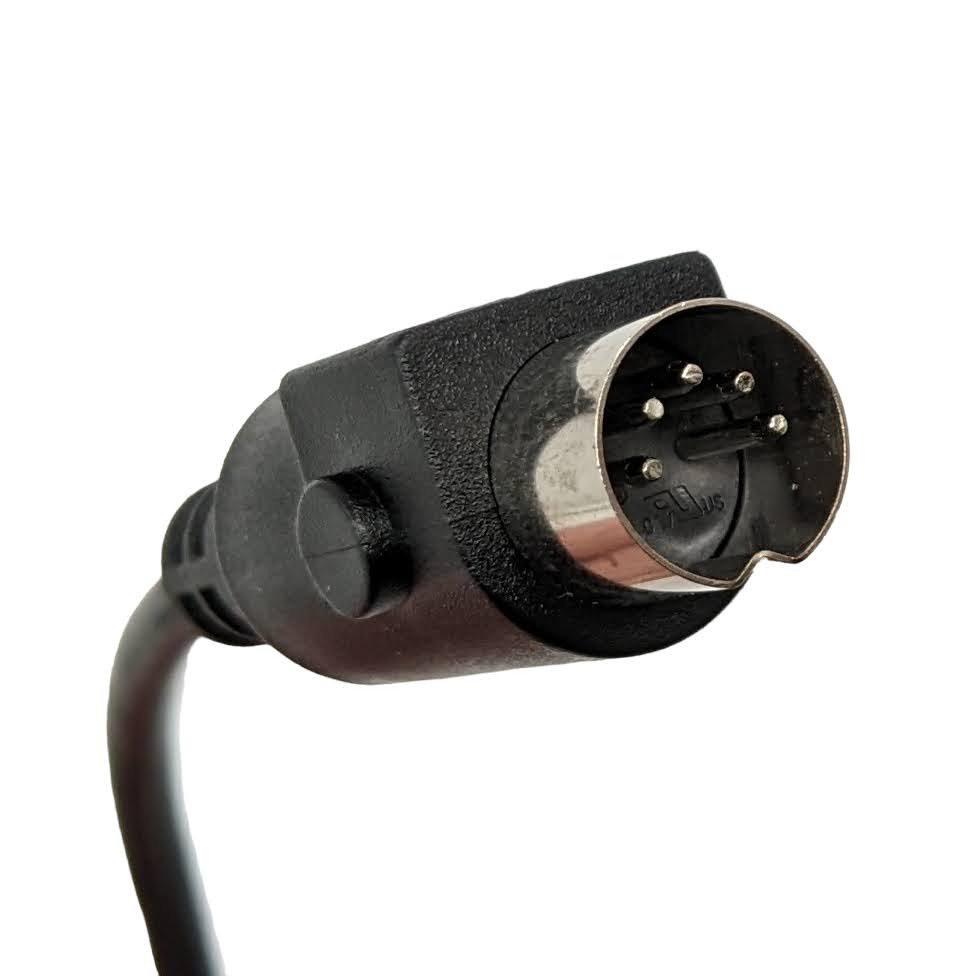
- Straight, 5-Pin Connector
- Number of Buttons:
- 15 Buttons
- Color:
- Black
This remote also replaces Ultra Comfort part number ZK3200-UC, they are the same remote, the only difference being the branding.
Lift Recliner Compatibility
- Golden Tech Day Dreamer & Power Pillow Series:
- PR630, PR631, PR632
- Golden Technologies Lift Recliner:
- PR406
- Golden Technologies Rhea:
- PR442
- Golden Technologies Dione:
- PR446
- Golden Technologies Titan:
- PR448
- Golden Technologies Regal:
- PR504
How To Calibrate TheZK3200-HC Remote
The following calibration information was taken from Golden Technolgies YouTube Channel and Website
AutoDrive™ Hand Control Factory Default Reset & Calibrations
1. Power Disruption Calibration
When power to a 4 or 5-zone recliner is disrupted, the backrest may not return to a fully upright position and/or the footrest may not fully extend. The Power Disruption Calibration should be performed to restore normal function of the chair. Models built before 2021 may be more sensitive to such power fluctuations. If power disruptions are frequent in your area, we recommended a separate battery backup that can be purchased at your local office supply store. This calibration must also be performed when electrical components are replaced or if the motor falls out of sync with the control box.
2. Position Accuracy Calibration
Depending on use over time, the Position Control buttons (REJUV, SIT, SLEEP, TV, ZG) may bring the chair to positions that are slightly different than those that are originally set. The Position Accuracy Calibration reminds the recliner of its FULL range of motion by taking the chair to Trendelenburg position, allowing it to glide into its original positioning with accuracy.
3. Factory Default Reset
If the Position Control buttons (REJUV, SIT, SLEEP, TV, ZG) do not take you to your personalized or programmed positions due to a power supply disruption, you can either:
- a) Reprogram each button to your personalized position (see Owner's Manual for instructions)
- b) Return all Position Control buttons to the positions programmed by the factory by performing the Factory Default Reset listed below.
Hand Control Procedures for the ZK3200-HC Hand Control

1. Power Disruption Calibration
Press and hold buttons A and C at the same time until chair stops moving. Continue to hold both buttons for an additional 5 seconds before releasing.
2. Positioning Accuracy Calibration
Press and hold button C until the footrest is fully extended. Release button C, then press and hold button A until the backrest is fully reclined.
3. Factory Default Reset
Press and hold the M button until lights on hand control flash. Within 5 seconds, press A and then press B.
The review section found below is currently experiencing a technical glitch where reviews are hidden by default. As a temporary workaround, please first click the "Questions (0)" tab, then click back to the "Reviews (0)" tab to make them appear. We apologize for the inconvenience while this is getting fixed.
View full details


Lift Chair Remote Compatibility & Troubleshooting
How do I know which lift chair remote to buy?
1. Search by Part Number: If you have the OEM part number or the model number located on the back of your current remote, type it into our search box. Manufacturers frequently update part numbers, but our search will usually pull up the newest compatible replacement.
2. Match the Specs: If you don't have a part number, use the filters on the left side of this page to match three critical details:
- Brand: (e.g., Pride Mobility or Golden Technologies)
- Connector Type: Check the plug at the end of your cord (e.g., 5-pin or 25-pin).
- Button Layout: Count the buttons and toggles. NOTE: Look closely at the text. Some remotes share the exact same button layout, but the buttons function differently. Example being a "Memory" button in place of a "Heat" button.
3. Ask an Expert: If you feel you have narrowed it down but aren't 100% sure, or if you simply can't find your remote, please call us at 585-678-1670. We will do our best to help you find exactly what you need!
Are lift chair remotes universal?
No, lift chair remotes are not completely universal. While many standard 2-button, 5-pin remotes are interchangeable between basic Okin or Limoss motors, chairs with advanced features like power headrests, lumbar support, or heat and massage require brand-specific OEM remotes to function safely.
Where do I plug in the replacement hand control?
Most remotes plug directly into the motor under the chair or into a junction box (control box) attached to the frame. If your chair uses an extension cable, the process is even easier, you can simply unplug the old remote from the extension cord without having to reach to far underneath the chair.
Important: Always unplug the chair from the wall outlet before disconnecting or reconnecting a new remote.
How do I know if my remote is broken or if it is a Motor or Control (Junction) Box
Before ordering a replacement remote, rule out power issues. First, ensure the chair is plugged into a working wall outlet. Second, check the power supply box (usually resting on the floor behind the chair), if it has a green light, it is receiving power. If the green light is on but the chair won't move, then try this...
Troubleshooting Your Chair: Is your recliner losing power randomly? If you find yourself having to jiggle the cable near the base of the remote just to get it to work, replacing the hand control should solve your problem. On the other hand, if your remote has power but an isolated part of the chair is stuck (like just the legrest), you are likely dealing with a bad control box or motor instead. We highly recommend watching our Diagnostic Video before placing an order. Still unsure? Give our experts a call at 585-678-1670 and we’ll help you figure it out!
How do you reset a power recliner remote?
Most standard lift chair remotes are "plug-and-play" and do not have a reset button. However, if your chair has a memory function or battery backup, you can perform a soft reset by unplugging the chair from the wall, disconnecting the power brick for 60 seconds, and then plugging everything back in. Some advanced remotes (like certain La-Z-Boy models) have a tiny pinhole reset button under the battery cover.
Safety & Compliance
Guaranteed OEM Factory Part
Our remote hand controls are NOT aftermarket imitations. They are genuine Original Equipment Manufacturer (OEM) parts, guaranteeing exact pin-compatibility, correct voltage regulation, and the exact same button lifespan as your original remote.
Industry & Medical Compliance
FDA Class II Device Component: Our hand controls are exact OEM (Original Equipment Manufacturer) replacement parts designed specifically to safely operate the motorized lifting mechanisms of FDA Class II registered medical lift chairs (such as those by Pride Mobility and Golden Technologies).
Safety Certified: Designed to meet strict electrical safety standards to prevent short circuits and ensure safe operation for elderly or mobility-impaired users.
HSA / FSA & Tax Exemption: Because our hand controls are replacement parts for durable medical equipment (DME), they may be eligible for tax exemption or HSA/FSA reimbursement depending on your state and provider.
Prop 65 Warning (Required for CA)
⚠️ WARNING: This product can expose you to chemicals including Di(2-ethylhexyl)phthalate (DEHP) and lead, which are known to the State of California to cause cancer and birth defects or other reproductive harm. For more information, go to www.P65Warnings.ca.gov.