Golden Technologies
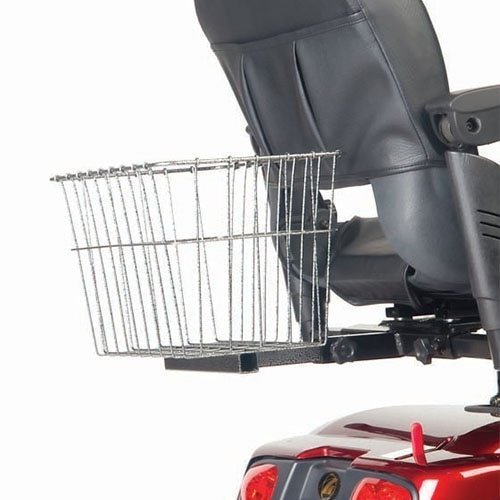
Golden Technologies Rear Basket Accessory (MBA-RBASK)
Golden Technologies Rear Basket Accessory (MBA-RBASK)
Regular price
$112.00 USD
Regular price
Our Price
$112.00 USD
Free Shipping On Most Items Over $40+ (Contiguous US Only) Shipping: Calculated at checkout Shipping Policy
In stock
Quantity
Couldn't load pickup availability
- Free ground shipping when you order before 2:00 PM EST (M-F)(Contiguous US Only)
- 30 Day Return Policy
- Fulfillment: Usually ships in 1-2 business days
- This Product Is Backed By A 90-day Limited Warranty Against Manufacturing Defects
Product Description
The Golden Technologies Rear Basket (Part Number: MBA-RBASK) provides a secure and spacious storage solution for your mobility scooter or power chair. Designed to keep your hands free and your items safe, this sturdy wire basket is perfect for shopping trips or carrying everyday essentials. It attaches by sliding into the standard 1" x 1" accessory bracket located on the back of the seat.
🛑 Important Fitment Note for Companion Scooters: While this basket fits directly onto Avenger, Buzzaround, Envy, and LiteRider models, Companion series scooters require the purchase of additional rear basket mounting hardware to ensure a secure fit.
- Manufacturer:
- Golden Technologies
- Part Number:
- MBA-RBASK
- Component Type:
- Rear Storage Basket
- Dimensions:
- 9.5" Width x 9" Depth x 14.5" Length
- Mounting Bar Size:
- 1" x 1"
Scooter & Power Chair Compatibility
- Avenger Series:
- Avenger (GA531 / GA541)
- Buzzaround Series:
- Buzzaround (GB101 / GB104 / XP3)
- Buzzaround Lite (GB106 / GB106XR / XP3)
- Buzzaround LT (GB107A / GB108A)
- Buzzaround XL 3-Wheel (GB116 / GB117)
- Buzzaround XL 4-Wheel (GB146 / GB147)
- Buzzaround EX 3-Wheel (GB118)
- Buzzaround LX (GB119 / GB149)
- LiteRider Series:
- LiteRider (GL110 / GL111 / GL140 / GL141)
- LiteRider Envy Power Wheelchair
- Companion Series (Requires Extra Hardware):
- Companion I (GC221 / GC222 / GC223 / GC240 / GC240C)
- Companion II 3-Wheel (GC321 / GC322 / GC323 / GC325 / GC340 / GC340C)
- Companion II 4-Wheel (GC421 / GC422 / GC440 / GC440C)