


Golden Technologies
Golden Technologies Lift Chair Recliner Control Box - GM3000-CB
Golden Technologies Lift Chair Recliner Control Box - GM3000-CB
Regular price
$246.00 USD
Regular price
Our Price
$246.00 USD
Free Shipping On Most Items Over $40+ (Contiguous US Only) Shipping: Calculated at checkout Shipping Policy
In stock
Quantity
Couldn't load pickup availability
- Free 2-day shipping when you order before 2:00 PM EST (M-F)(Contiguous US Only)
- Need it tomorrow? Select overnight shipping at checkout before 2:00 PM EST (M-F)(Contiguous 48 states).
- 30 Day Return Policy
- Fulfillment: Usually ships in 1-2 business days
- This Product Is Backed By A 90-day Limited Warranty Against Manufacturing Defects
Product Description
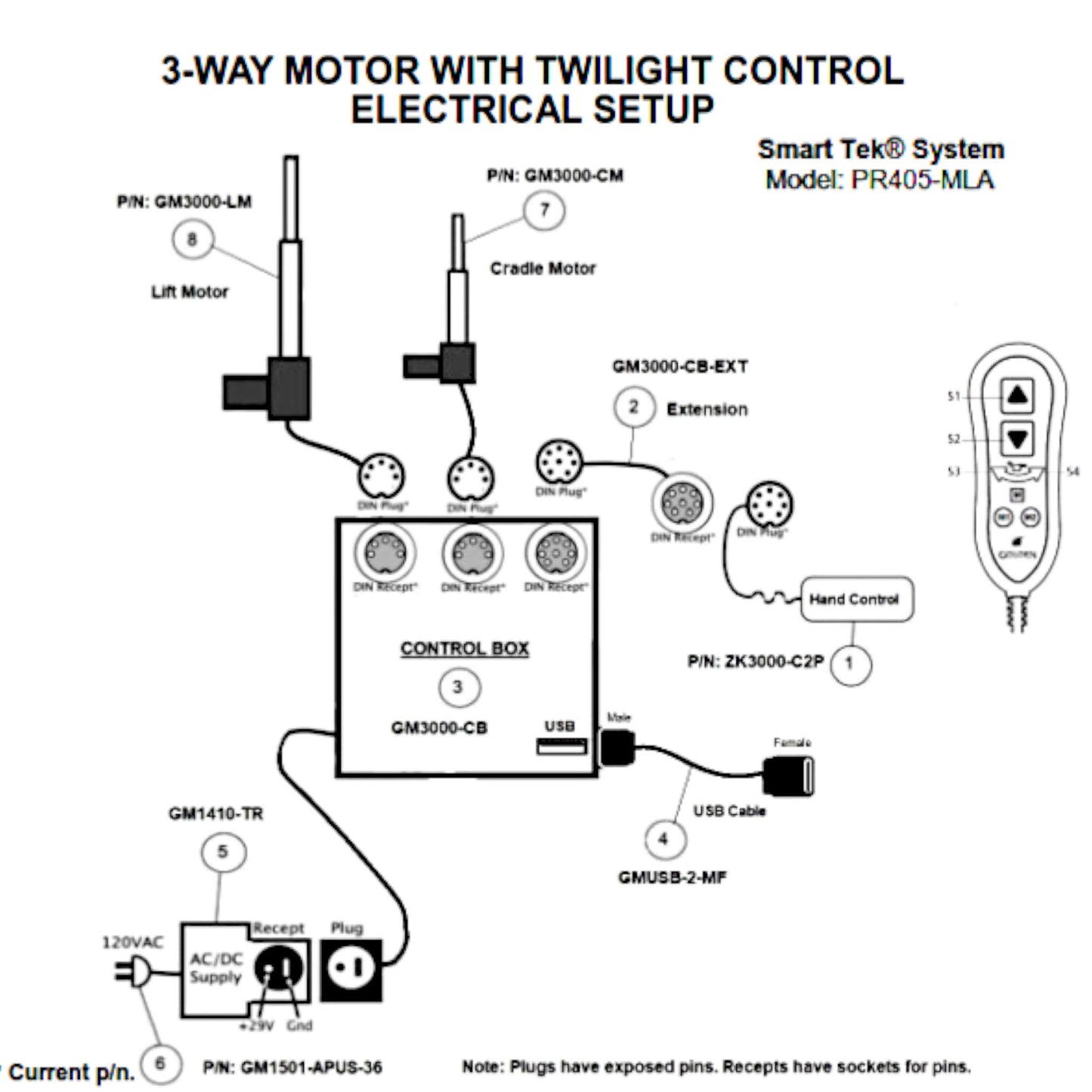
Genuine OEM replacement control box (Part Number: GM3000-CB) for Golden Technologies and Ultra Comfort power lift recliners. This control box is designed to work with remote hand control part number ZK3000-C2P (8-Pin Connector) and includes a USB charging port, and two 5-pin Motor ports.
Specifications:
- Brands:
- Golden Technologies & Ultra Comfort
- Control Box Part Number:
- GM3000-CB
- Compatible Remote Part Numbers:
- ZK3000-C2P & ZK3000-C2P-UC (Ultra Comfort Version)
- Motor Connectors:
- 5-Pin Connectors (Lift Motor & Cradle Motor)
- Handset Connector:
- 8-Pin Connector
- Power Supply Connector:
- 2-Pin Black Connector
- Serial Number:
- On the motors Left side, a 16 character serial number labeled as: S/N: 30CBxxxxxxxxxxxx. The first 4 characters designate the part number and the next four characters are the date.
- Features:
- One USB Charging Port
Golden Technologies Power Lift Chair Compatibility
- Compatible Models (Uses ZK3000-C2P)
- Signature Series (Orion): Model Number PR405 (PR405-MLA)
Ultra Comfort Power Lift Chair Compatibility
- Compatible Models (Replaces Remote: ZK3000-C2P-UC)
- Eclipse Series: Model Numbers UC490-MLA, UC546-JPT, UC546-M, UC546-L


Disclosures
California Proposition 65 Warning: Electrical Components
California Proposition 65 Warning: Electrical Components
• Choking Hazard: Small Parts
Choking Hazard: Small Parts
Choking Hazard: Small Parts
 Choking Hazard: Small Parts
Choking Hazard: Small Parts
Choking Hazard: Small Parts
Choking Hazard: Small Parts
Choking Hazard: Small Parts