

Pride Mobility
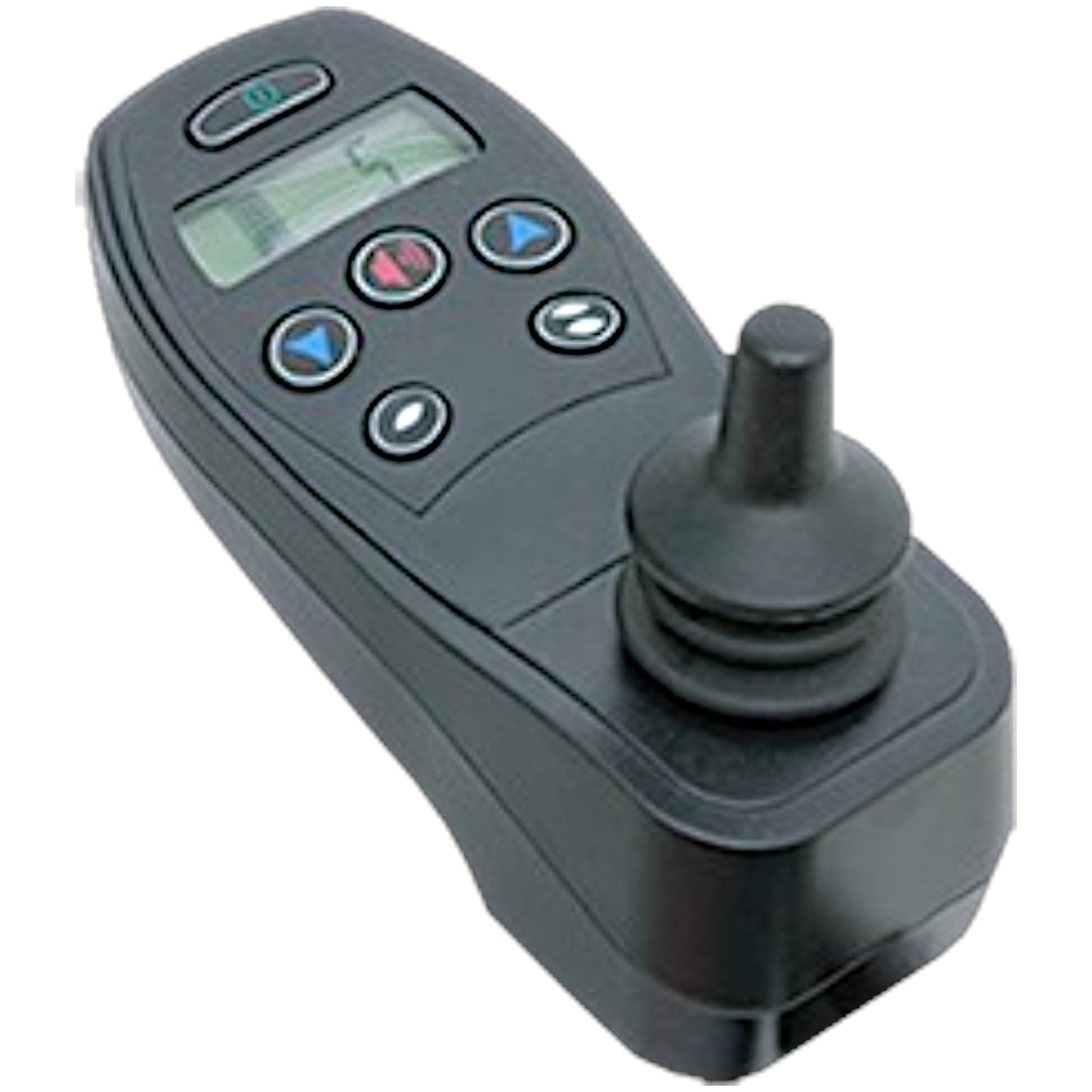
Pride Mobility Q-Logic NE+ 6-Key Joystick Controller (CTLDC1560)
Pride Mobility Q-Logic NE+ 6-Key Joystick Controller (CTLDC1560)
In stock
Couldn't load pickup availability
- 30 Day Return Policy
- Fulfillment: Usually ships in 1-2 business days
- This Product Is Backed By A 90-day Limited Warranty Against Manufacturing Defects
Product Description
The Q-Logic NE+ Series Joystick Controller (Pride Part Number: CTLDC1560) is an OEM replacement module manufactured by Curtis for Pride Mobility and Quantum Rehab. This primary control interface manages your power chair's speed, direction, and actuator seating functions. This specific module features the 6-key configuration.
Key Features
- Non-expandable rehab electronics deliver simplicity without limiting features.
- Features an easy-to-read data display, soft-touch buttons, and a built-in charger port.
- Offers 2-actuator control for TRU Balance® Power Positioning Systems.
- Equipped with a standard 1/8" auxiliary port to accommodate adaptive switches.
Description from the Pride Mobility service manual: controller,joystick module,curtis ne plus,6 key,switch jacks and actuators,h-1111-268,(curtis: 17905700)
Important Order Note: This is the 6-key (button) version of the Q-Logic NE+ controller. Please verify that your existing joystick also has exactly 6 keys before ordering to ensure compatibility with your chair's programming and functions.
- Brand:
- Pride Mobility / Quantum Rehab
- Manufacturer:
- Curtis
- Pride Part Number:
- CTLDC1560
- Curtis Part Number:
- 1751-6209
- Replaces Part Number:
- 17905700
- Component Type:
- Joystick Module / Controller
- Configuration:
- 6-Key
Power Chair Compatibility
- Pride Jazzy Series:
- Jazzy 600
- Jazzy J6 / Pride J6
-
Quantum Series: - Quantum J4 / J4E
- Quantum J6
- Quantum Q6 Edge / Q6 Edge HD
- Quantum Q6 Edge 2.0 / Q6 Edge 2.0 X
- Quantum Q6 Edge 3 / Q6 Edge 3.0 / Q6 Edge 3 Stretto
- Quantum Q6 Edge X / Q6 Edge Z
- Quantum Q600 / Q600XL
- Quantum Q6000 / Q6000XL / Q6000Z
- Quantum Q614
- Quantum R-TRAK
- Quantum Rival
Operation & Safety Instructions
The NE+ controller features an intuitive interface allowing the user complete control over chair movement and seating features. Below are the basic operational instructions extracted from the Pride/Quantum manuals:
Selecting & Adjusting Drive Profiles
- Press the On/Off button to power on the controller.
- Press the Profile Decrease or Profile Increase button until you reach the desired speed/profile setting on the LCD screen.
Operating Power Actuators & iLevel® Seating
If your power chair is equipped with power actuators (such as power elevating leg rests, tilt, recline, or the iLevel® seat elevation system), you can adjust them using the controller:
- Press the On/Off button to power on the controller.
- Press either the Profile Decrease or Profile Increase button until you reach actuator mode.
- Push the joystick to the left or right to cycle through the available actuators. The actuator indicators on the screen will display which actuator is selected (e.g., the seat icon will illuminate for the elevating seat mode).
- Once the desired actuator is selected, push the joystick forward to lower the actuator, or pull the joystick in reverse to raise the actuator. (Note: When using the iLevel® system, pushing forward adjusts the position in one direction, while pulling in reverse adjusts it in the opposite direction).
- When finished, press the Profile Decrease or Increase button to return to your desired drive profile.
iLevel® Warning: The iLevel® feature should only be used on flat, level, indoor surfaces (such as malls or clinics) or hardscape outdoor surfaces. Never raise the seat from its lowest position on an inclined, bumpy, or uneven surface to prevent the chair from tipping over.
Lock / Unlock Mode
The controller can be locked to prevent unauthorized use.
- To Lock: Press and hold both the Profile Decrease and Profile Increase keys simultaneously until the system shuts off. The system is now locked.
- To Unlock: Press the On/Off key to turn on the controller (a key icon and battery condition meter will appear). Move the joystick to the full forward position until it beeps. Then, move the joystick to the full reverse position until it beeps. Release the joystick to unlock the controller.
Charging & General Safety Guidelines
- Charging: Use the 5-pin off-board charger/programming socket located on the front of the controller. Ensure the charger current does not exceed 8 amps.
- Sleep Mode: The controller features a sleep mode that shuts off main power if the joystick remains stationary for a programmed period (0-240 minutes). Press the On/Off key to restore power and resume operation.
- Harness Routing: Prevent harness damage by routing the controller harness under the armrest or toward the inside of the armrest pad. Proper tie-down points prevent the harness from getting caught in wheels or pinched in the seat frame.
- Electromagnetic Interference (EMI): Cell phones, two-way radios, and other transmitters can cause unintended movement. Turn off the power chair when safe to do so if unintended motion or brake release occurs.
Disclosures
California Proposition 65 Warning: Electrical Components
California Proposition 65 Warning: Electrical Components
• Choking Hazard: Small Parts
Choking Hazard: Small Parts
Choking Hazard: Small Parts
 Choking Hazard: Small Parts
Choking Hazard: Small Parts
Choking Hazard: Small Parts
Choking Hazard: Small Parts
Choking Hazard: Small Parts