Free Shipping On Most Items Over $40+ (Contiguous US Only) Shipping: Calculated at checkout Shipping Policy
Special OrderShips from our Fairport, NY shop in about 1 week (5 business days)
Quantity
Couldn't load pickup availability
Free ground shipping when you order before 2:00 PM EST (M-F)(Contiguous US Only)
Need it tomorrow? Select overnight shipping at checkout before 2:00 PM EST (M-F)(Contiguous 48 states).
30 Day Return Policy
Fulfillment: Special order – ships from our Fairport, NY shop in about 1 week (5 business days)
This Product Is Backed By A 90-day Limited Warranty Against Manufacturing Defects
Product Description
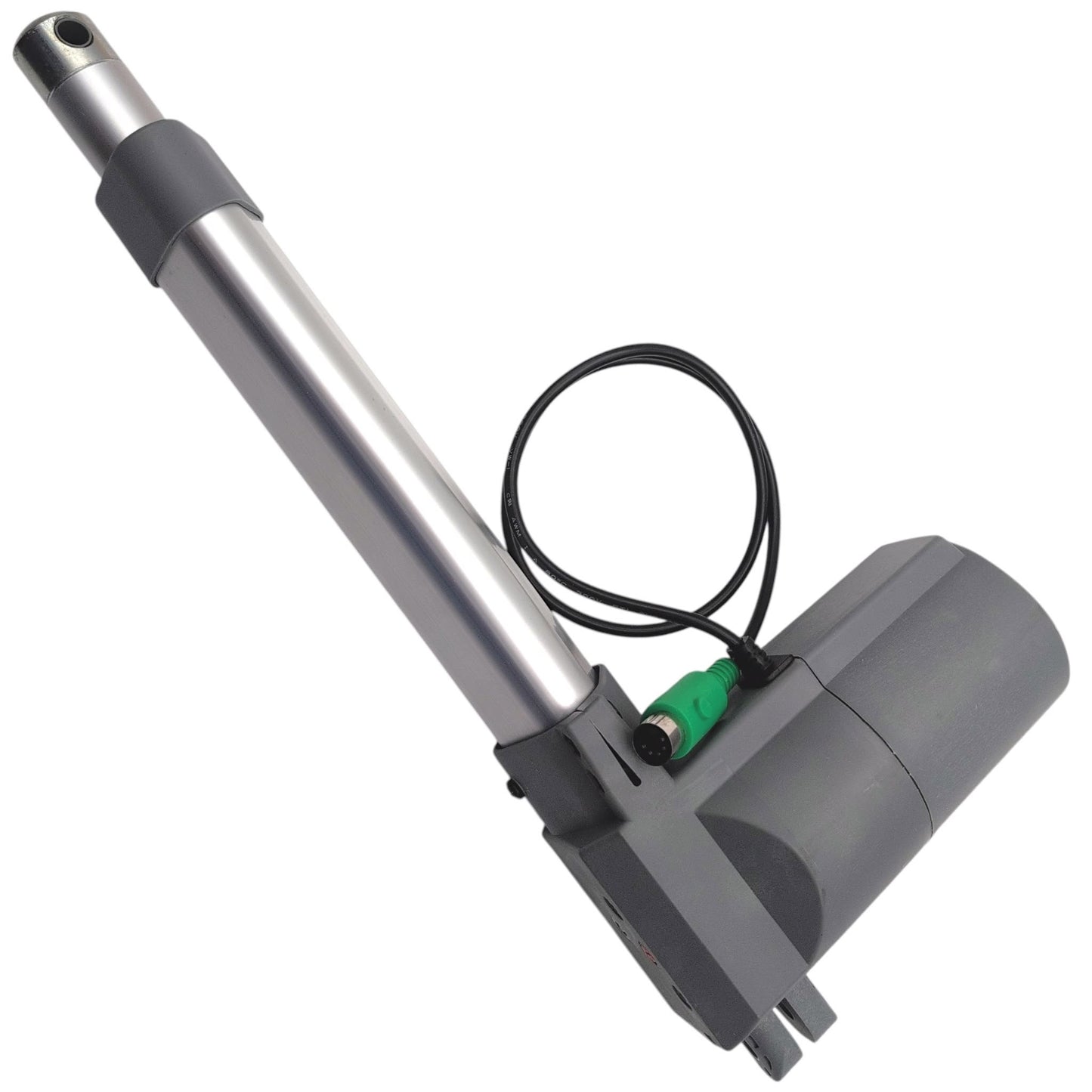
Genuine OEM replacement base/slave linear actuator motor (Part Number: MOT2302982) manufactured by MotoMotion / HHC for the Pride Mobility VivaLift! Atlas Plus: Model Number PLR-2985(M), as well as various Franklin and Flexsteel chairs. Identified by Model Number: LMD6208C1-3, this motor replaces several older iterations and uses a 5-pin green 🟢 DIN connector.
Description From The Pride Mobility Service Manual: Motor, Slave Motor, 5-Pin, Lift Chair, Base, (HHC: LMD6208C1-3-00000)
Important Note! | Please Read Before Ordering
Specifications:
Brand:
Pride Mobility
Manufacturer:
MotoMotion / HHC
Pride Mobility Part Number:
MOT2302982
Moto / HHC Model Number:
LMD6208C1-3
Moto / HHC Base Model:
LMD6208
Replaces:
LMD6208C-U-3, LMD6208C-3, and LMD6208C1-31
Connector Type:
5-Pin Green 🟢 Din Connector
Input:
24 Volts DC Max. 4.5 Amps
Stroke:
165mm
Compatible Lift Chairs
VivaLIFT! Atlas Plus Power Lift Recliner: PLR2985M
Pride Mobility VivaLift! Atlas Plus: Model Number PLR-2985(M)
Great service. I ordered the wrong piece but got it easily exchanged. My husband was ready toss the chair but we fixed it for a 10th of cost of new chair cost.
M
Ms. Surratt
Reasonably priced. The app is very user friendly. Order arrived by date projected. Tracking updates sent daily til delivered.
Disclosures
California Proposition 65 Warning: Electrical ComponentsCalifornia Proposition 65 Warning: Electrical Components•Choking Hazard: Small PartsChoking Hazard: Small Parts
⚠️ Warning: This product can expose you to chemicals including styrene, Bisphenol A (BPA), and phthalates, which are known to the State of California to cause cancer and birth defects or other reproductive harm. Wash hands after handling electrical cords or internal components. For more information, go to www.P65Warnings.ca.gov.
Choking Hazard: Small Parts
WARNING: CHOKING HAZARD — Small parts. Not for children under 3 years.
Choosing a selection results in a full page refresh.
Opens in a new window.
Dwight Irwin
Fast delivery and customer service is excellent
Mobile Mobility Service
Dwight Irwin
Fast delivery, customer service is excellent
Pride Mobility - Control Box - CTL1707193 - CM310
Michael Baker
Motor arrived swiftly and was installed in minutes. Works perfectly
Pride Mobility - Lift Chair Motor - MOT1707192 - LMD6208C-U-3
Anonymous
It’s working well
Golden Technologies - Lift Chair Remote - ZKAD-5
Lucas Scott
Tracking information was provided and I experienced no delays. I received the part in roughly a week or so and was able to promptly replace the faulty preexisting control box.
Pride Mobility CTL2100005 Control Box CM310K48 Heat 4-Motor CM31048-1


 Choking Hazard: Small Parts
Choking Hazard: Small Parts
Choking Hazard: Small Parts
 Choking Hazard: Small Parts
Choking Hazard: Small Parts
Choking Hazard: Small Parts